Note: The screenshots in this article are currently taken from the Japanese version of the product. Some labels in the images may differ from the English interface.
Overview
This page describes how to integrate Box with File Governance.
Reference: About the File Governance Feature
With the Box integration for File Governance, you can visualize up to 75,000 files and folders, sorted by the last modified date. Therefore, if there are a large number of files in the integrated account, older files and folders may not be included in the synchronization.
Prerequisites
To use this feature, prior configuration is required on the Box side.
Please refer to the following steps to change the permission for the Josys app to "Available to All Users" in the Box Admin Console.
- Log in to the Box Admin Console.
- Open the integration permission settings for the Josys app and change it to "Available to All Users."
- Once you have completed the settings in Box, open the Josys admin panel and make sure to re-integrate the Box app.
Integration Steps
- <If you have already integrated the app> Proceed to the next step.
<If you have not integrated the app yet> Refer to the page below to integrate the app.
Reference: Box - From the left menu, click "Integrations > External Data Sources."
- Click the "Integrate" button within File Governance.
- A pop-up will appear in the bottom left. The process is complete when a checkmark is displayed.
- From the left menu, click "Access > File Governance" to display the synchronization screen. Please wait until the synchronization is complete. Synchronization may take some time.
⚠️To enable File Governance, additional permissions beyond the standard app integration are required. Therefore, if you have already integrated Box with Josys, a message may appear indicating that re-integration is required.
In this case, click "Re-integrate App" in the displayed pop-up to proceed with the re-integration.
Reference: Deleting / Re-integrating Apps
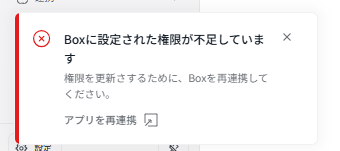
In this case, click "Re-integrate App" in the displayed pop-up to proceed with the re-integration.
Reference: Deleting / Re-integrating Apps